


Learning how to use AI for automation is no longer just a competitive advantage; it is a survival necessity for modern business operations.
This guide moves beyond the buzzwords to help you implement intelligent workflows that save time, cut costs, and drastically reduce human error starting today.
What is AI Automation? (More Than Just Macros)
To understand how to use AI for automation, we must first distinguish it from traditional automation. While standard automation (often called Robotic Process Automation or RPA) follows strict “if-this-then-that” rules, AI automation uses Machine Learning (ML) and Natural Language Processing (NLP) to make decisions.
Think of RPA as the “digital hands” that click buttons, while AI is the “digital brain” that reads, analyzes, and decides what to do next.
AI Automation vs. Traditional RPA
Bing and other search engines prioritize content that clearly distinguishes these technologies. Here is how they stack up:
| Feature | Traditional Automation (RPA) | AI Automation (Intelligent Automation) |
|---|---|---|
| Core Function | Follows pre-set rules strictly. | Learns from data and adapts. |
| Data Handling | Structured data only (Excel, SQL). | Unstructured data (Emails, Images, Voice). |
| Complexity | Linear, repetitive tasks. | Complex, decision-based workflows. |
| Example | Copying data from a PDF to Excel. | Reading an email and drafting a contextual reply. |
For further reading on the evolution of automation, check out McKinsey’s analysis on Intelligent Process Automation.
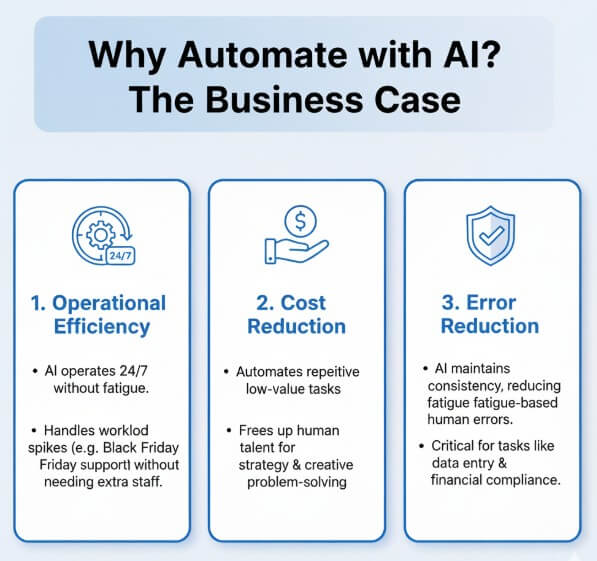
Why Automate with AI? The Business Case
Before diving into the tools, you need to justify the implementation. Businesses that successfully deploy AI automation typically report significant improvements in three key metrics:
- Operational Efficiency: AI operates 24/7 without fatigue, handling spikes in workload—like Black Friday support tickets—without needing extra staff.
- Cost Reduction: By automating repetitive low-value tasks, you free up expensive human talent to focus on strategy and creative problem-solving.
- Error Reduction: Humans are prone to fatigue-based errors. AI maintains consistency, which is critical for tasks like data entry and financial compliance.
The Automation ROI Formula
To prove the value to your stakeholders, use this simple formula to calculate potential savings before you start:
(Time Spent per Task × Frequency per Month × Hourly Wage) = Monthly Automation Opportunity
Top Use Cases: Where to Apply AI Automation
You can apply these strategies across almost every department. Here are specific semantic clusters of activities where AI thrives:
1. Customer Support (Conversational AI)
Instead of static FAQs, use Generative AI agents. Tools like Intercom or Zendesk AI can now understand intent, sentiment, and context to resolve complex queries instantly, only escalating to a human when necessary (a concept known as “Human-in-the-loop”).
2. Human Resources (Talent Acquisition)
AI can parse thousands of resumes in seconds. By utilizing NLP, systems can rank candidates based on relevant skills rather than just keyword matching, significantly speeding up the recruitment pipeline.
3. Marketing & Sales (Lead Scoring)
Stop wasting time on cold leads. AI analyzes historical data to predict which leads are most likely to convert. Furthermore, tools can automate personalized email outreach that sounds human-written, increasing open rates.
The Secret Ingredient: Prompt Engineering for Automation
Having the right tools is only half the battle; you also need to know how to speak their language. Most automation failures happen because of poor instructions. To make your AI automation reliable, you must master Prompt Engineering.
When setting up automated triggers (e.g., “Summarize this email”), use the C.I.O. Framework:
- Context: Give the AI a role. “You are a senior customer support agent.”
- Instruction: Be specific. “Summarize the complaint below and draft a polite, empathetic response.”
- Output: Define the format. “Output the response in JSON format only.”
By structuring your prompts, you reduce the variance in the AI’s output, making your automation stable enough for business use.
How to Automate Tasks with AI: A Step-by-Step Workflow
This is the core of our guide. Follow this logical framework to master how to use AI for automation without overwhelming your team.
Step 1: Conduct a Workflow Audit
Don’t automate everything. Start by identifying tasks that are repetitive, volume-heavy, and rules-based. Ask your team: “What task do you hate doing every Monday morning?” That is usually your best candidate for automation.
Step 2: Select Your Tech Stack
You do not need to be a coder to start. The market is filled with “No-code” and “Low-code” platforms.
- Connectors: Platforms like Zapier or Make (formerly Integromat) act as the glue between your apps.
- Intelligence: Connect these platforms to OpenAI’s GPT-5 or Anthropic’s Claude to process the information.
Step 3: Clean Your Data
AI is only as good as the data it is fed. Before deploying a model, ensure your customer lists, internal wikis, or financial records are organized and digital. Bad data leads to “hallucinations” or incorrect actions.
Step 4: Pilot and Test (The “Sandbox” Phase)
Run your automation on a small dataset first. For example, if you are automating invoice processing, run 50 past invoices through the system and compare the AI’s output against the manual records to verify accuracy.
Step 5: Scale and Monitor
Once the pilot succeeds, deploy it to the wider workflow. However, continuous monitoring is vital. AI models can “drift” over time, so regular check-ins ensure the system remains accurate.
Navigating the Challenges: Risks and Solutions
While the benefits are immense, the top-ranking experts acknowledge that AI automation comes with risks. Being aware of these will set your strategy apart from the amateurs.
- AI Hallucinations: Generative AI can sometimes invent facts confidentially. Solution: Always implement a “Human-in-the-loop” step for high-stakes tasks like financial approvals or medical advice.
- “Shadow AI”: This occurs when employees use unapproved AI tools, risking data leaks. Solution: establish a clear company AI policy and provide enterprise-grade access to tools like ChatGPT Enterprise or Microsoft Copilot.
- Data Bias: If your historical data is biased, your automation will be too. Solution: Regularly audit your AI’s decisions for patterns of bias, especially in hiring and lending workflows.
Top Tools to Get Started Immediately
To rank for specific tool-related queries, we have curated a list of the most effective software available in 2025:
- Zapier: The industry leader for connecting apps. Its new “Zapier Central” feature allows you to teach AI bots how to perform tasks across 6,000+ apps.
- Microsoft Copilot: Best for enterprise users. It integrates deeply with Word, Excel, and Outlook to automate document creation and data analysis within the Microsoft 365 ecosystem.
- UiPath: A heavy-hitter for enterprise-grade Robotic Process Automation that now heavily incorporates AI for document understanding.
- HubSpot: For marketing teams, their integrated AI tools automate content creation, social media scheduling, and email drafting.
Explore more about integration possibilities on the Zapier Learning Center.
The Future: From Chatbots to Agentic AI
New Section
As we look toward the end of 2025, the landscape is shifting from “Copilots” (assistants that wait for your command) to “Autonomous Agents.”
Agentic AI can break down a high-level goal—like “Plan a marketing campaign for Q4″—and autonomously create the tasks, draft the content, and schedule the meetings without needing step-by-step prompting. Preparing your data structure now (Step 3 in our workflow) will ensure you are ready for this next wave of automation.
Frequently Asked Questions (FAQ)
Q: Do I need to know how to code to use AI for automation?
A: No. The rise of no-code platforms like Zapier and Make allows non-technical users to build complex AI workflows using simple drag-and-drop interfaces.
Q: Is AI automation expensive?
A: It can be surprisingly affordable. Many tools offer “freemium” models. For small businesses, an automation stack might cost less than $50/month, while delivering thousands of dollars in labor savings.
Q: Will AI replace my job?
A: It is unlikely to replace your job entirely, but it will change it. AI replaces tasks, not roles. The goal is to remove the “robot” parts of your job so you can focus on the “human” parts, like strategy and relationship building.
Q: Is my data safe with AI automation?
A: Security is a valid concern. Always choose enterprise-grade tools that comply with GDPR and SOC2 standards. Avoid inputting sensitive personal data (PII) into public AI models.
Conclusion
Understanding how to use AI for automation is the single most impactful skill a business leader or employee can acquire in 2025. By moving from understanding the core concepts to implementing a strategic workflow—and safeguarding against the risks of data bias and hallucinations—you can transform your operations from reactive to proactive.
Start small: Audit your workflows today, pick one repetitive task, and use a tool like Zapier to automate it. The efficiency gains will speak for themselves.
Ready to streamline your business? Share this guide with your team or leave a comment below about the first task you plan to automate!

IT Security / Cyber Security Experts.
Technology Enthusiasm.
Love to read, test and write about IT, Cyber Security and Technology.
The Geek coming from the things I love and how I look.