


If you are wondering how to earn Microsoft Rewards points fast, you have come to the right place. Earning free gift cards and Xbox Game Pass subscriptions shouldn’t take months.
This guide breaks down the ultimate daily strategy to maximize your rewards with minimal effort. Let’s dive right in.
How To Earn Microsoft Rewards Points Fast (Daily Quick Wins)
To kick things off, you must focus on your daily digital habits. When people ask us how to get Microsoft Points fast, we always point them to these frictionless daily micro-tasks first. By restructuring how you search the web, you can generate points passively.
1. Set Bing as Your Default Search Engine (PC & Mobile)
Search engines are the easiest gateway to earning rewards. By setting Bing as your default search engine on your desktop and mobile browser, you earn points for every search query.
Microsoft limits your daily earnings to prevent spam, capping desktop searches at up to 150 points per day and mobile searches at 100 points per day (depending on your region and account level).
Download the Bing mobile app to ensure you hit your mobile quota seamlessly.
2. Browse with Microsoft Edge for Multipliers
Using the Google Chrome browser leaves free points on the table. If you switch to the Microsoft Edge browser, you activate a specific ecosystem multiplier.
You can read our article on how to change your default browser to Microsoft Edge.
Microsoft rewards users with up to 20 bonus points daily simply for conducting their Bing searches natively within Microsoft Edge.
3. Complete Your “Daily Sets” and Quizzes
Navigate directly to your Microsoft Rewards Dashboard every morning. Here, you will find “Daily Sets,” which consist of three quick tasks. These usually include a short trivia quiz, a “This or That” poll, and an informational link to click.
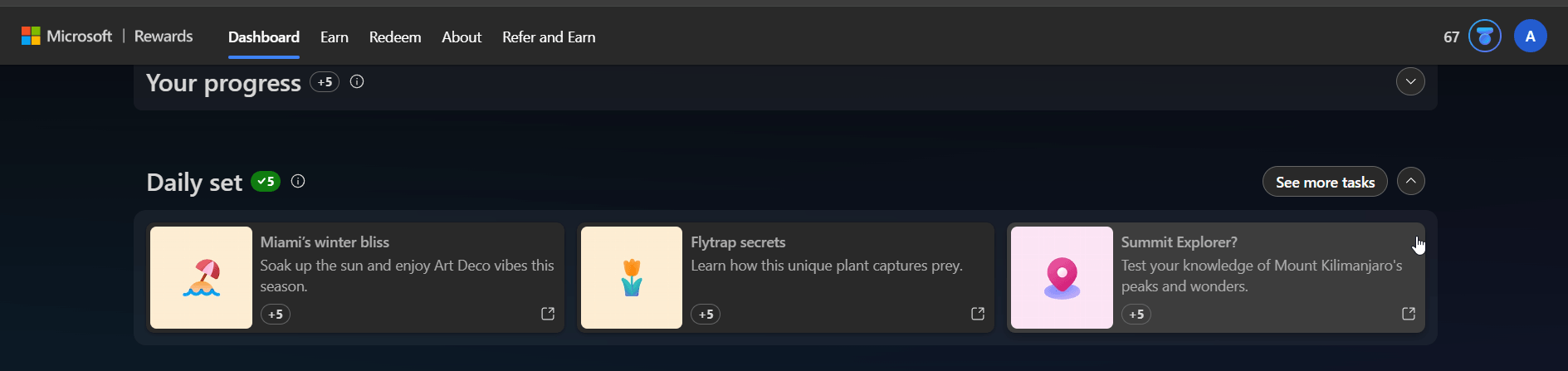
Completing these tasks takes less than two minutes and guarantees a steady influx of base points.
How to Level Up and Maximize Point Multipliers
Consequently, earning points isn’t just about random searching; it’s about algorithmic consistency. You need to leverage gamification to multiply your efforts.
4. Maintain Daily Streaks for Bonus Points
Once you complete your Daily Sets for consecutive days, you trigger a “Streak.” Streaks act as massive point multipliers.
For example, completing a 3-day streak awards you a lump sum of bonus points, which scales up for 10-day, 30-day, and longer milestones. Never miss a day if you want to optimize your yield.
5. Reach “Level 2” Status
Microsoft operates on a tiered loyalty system. Every new user starts at Level 1, which heavily restricts daily earning caps. By earning just 500 points in a single month, you automatically upgrade to Level 2.
Level 2 status instantly increases your daily search limits and offers up to a 10% discount when redeeming points for Microsoft brand gift cards.
Earning Microsoft Points via Xbox and Gaming
Furthermore, gamers hold a massive advantage in the rewards ecosystem. For console players researching how to get microsoft points fast, integrating your daily gaming sessions is an absolute game-changer.
6. Complete Xbox Game Pass Quests
If you subscribe to Xbox Game Pass Ultimate, you unlock exclusive access to Game Pass Quests. These quests reward you for playing specific titles on the service.
You can earn points daily just by logging into a Game Pass game, while weekly and monthly quests (like getting 50 kills in a specific shooter) offer substantial payouts ranging from 250 to 500 points.
7. Use the Xbox App and Play PC Games
PC gamers can also join the fun. Open the Xbox app on your Windows PC daily to claim login bonuses.
Furthermore, simply playing a PC game for 10-15 minutes triggers a “Play a PC Game” daily bonus on your rewards app, netting you highly lucrative points with zero extra effort.
8. Unlock Xbox Achievements
Microsoft incentivizes you to actually finish the games you play. Activate the daily achievement punch card on your console’s Rewards app. Every day you unlock an achievement in any Xbox game, you earn a flat bonus of 50 points.
Earning Points Through Microsoft Store Purchases
Additionally, if you plan to spend money on digital goods anyway, you should get rewarded for it through monetary investments.
9. Rent Movies and Buy Digital Games
Whenever you buy a digital game, rent a movie, or purchase hardware from the official Microsoft Store, you earn points based on the dollar amount spent.
Level 1 members earn 10 points per $1 spent, while Level 2 members earn a generous 20 points per $1.
Bonus Strategies: Hidden Gems to Accumulate Points
Beyond the standard search and gaming methods, there are several lesser-known avenues to pad your point balance. Implementing these semantic, mobile-first strategies will ensure you squeeze every possible point out of the ecosystem.
Read News on the Microsoft Start App
If you already use your smartphone daily, download the Microsoft Start app. The app features a daily “Read to Earn” task where you can earn up to 30 points simply by clicking and reading news articles (usually 3 points per article). It is a highly passive way to earn while catching up on current events.
Install the Microsoft Rewards Extension
For desktop users, installing the official Microsoft Rewards browser extension often grants a quick, one-time bonus (sometimes up to 50 points). More importantly, it keeps your daily point quota visible on your browser toolbar, ensuring you never forget to hit your daily search caps.
Scan Your Grocery Receipts
Microsoft has deeply integrated its Cashback program into the Rewards ecosystem. By using the Bing or Start mobile app to scan your everyday grocery receipts, you can earn bonus points alongside direct cashback. This brilliantly bridges the gap between digital web tasks and physical shopping.
Check Your Promotional Emails
Make sure you are subscribed to the Microsoft Rewards email newsletter. Microsoft routinely sends out monthly updates that contain “hidden” links embedded in the images and text. Clicking these promotional links can instantly deposit an additional 30 to 50 free points into your account.
Advanced Tactics: Xbox App Secrets & The Auto-Redeem Hack
To truly outpace the average user, you need to employ the unique, advanced strategies that dedicated point farmers use. These tactics take advantage of obscure app features and account settings to maximize your daily yield and stretch the value of your points further.
Play “Jewel” on the Xbox Mobile App
While most guides mention the PC and console apps, they completely overlook the Xbox Mobile App. If you open the official Xbox app on your smartphone and navigate to your profile tab, you will find a daily quest to play one level of the built-in Jewel mobile game.
Completing this single level takes less than 60 seconds and yields a fast 30 points every single day.
Trigger the “Play With Friends on PC” Multiplier
This is arguably the best-kept secret in the Microsoft Rewards community. If you play a multiplayer PC game (like Halo Infinite or Asphalt 9) while signed into your Xbox account, you trigger the “Play with friends on PC” bonus.
If you maintain an active Game Pass subscription and have at least seven friends on your Xbox friends list, this bonus multiplies massively, potentially rewarding you with upwards of 100 to 250 points daily for simply sitting in a multiplayer lobby.
Utilize the Auto-Redeem Discount Hack
Accumulating points fast is only half the battle; spending fewer points to reach your goal is the ultimate shortcut. Microsoft offers an “Auto-Redeem” feature on the Rewards dashboard.
By opting to automatically redeem your points at the start of every month for specific items (like a $10 Xbox Gift Card or a month of Game Pass Ultimate), Microsoft applies a heavy discount. For instance, a $10 gift card drops from 10,000 points down to 8,750 points.
This functionally boosts your earning speed by moving the finish line closer.
Hunt for Seasonal “Free” Punch Cards
Keep a close eye on your Microsoft Rewards dashboard during major holidays and awareness events (such as Earth Day, Women’s History Month, or the Lunar New Year).
Microsoft frequently drops special thematic punch cards that award between 500 and 1,000 points. Unlike purchase-based punch cards, these usually only require you to click a few educational links or unlock a single achievement in any game to claim massive payouts.
Warning: Will a VPN Get You Banned from Microsoft Rewards?
Because point payouts vary by country, many users attempt to cheat the system by using Virtual Private Networks (VPNs) to access daily sets in the US, UK, and other high-paying regions. Do not do this.
Microsoft’s detection algorithms are incredibly sophisticated. Using bots, automated search scripts, or VPNs directly violates the Microsoft Services Agreement. If the system catches you spoofing your location or automating searches, Microsoft will permanently ban your Rewards account, wiping out all your unredeemed points in the process. Always earn your points legitimately.
Are Microsoft Rewards Points Worth It? (Point-to-Dollar Value)
To understand your Return on Investment (ROI), you must know the exact exchange rate of your points. While point values fluctuate slightly depending on the specific gift card you redeem, the baseline math generally equates to 1,000 points = $1.00.
Here is a breakdown of what your points can buy you:
| Reward Target | Approximate Points Required | Estimated Value |
|---|---|---|
| Amazon or Target Gift Card | 5,250 Points | $5.00 |
| Xbox Gift Card | 10,000 Points | $10.00 |
| Xbox Game Pass Core (1 Month) | 8,500 Points | $9.99 |
| Xbox Game Pass Ultimate (1 Month) | 14,000 Points | $16.99 |
Frequently Asked Questions (FAQ)
Do Microsoft Rewards points expire?
Yes, Microsoft Rewards points do expire. If your account remains inactive—meaning you do not earn a single point or redeem any points—for 18 consecutive months, your entire point balance will be voided and reset to zero.
Is there a daily limit to Microsoft points?
Yes. Microsoft implements daily earning caps to prevent abuse. On average, Level 2 users can earn up to 150 points via PC Bing searches, 100 points via mobile searches, and 20 points from using Microsoft Edge. The exact daily limit varies slightly based on your geographic region.
Can you transfer Microsoft points to another account?
Historically, Microsoft allowed users to use the “Microsoft Family” feature to transfer up to 5,000 points a month to family members. However, Microsoft recently disabled this feature to combat point-farming accounts, meaning you can no longer transfer points between accounts. You must spend the points on the account that earned them.
How many Microsoft Rewards points can I earn in a month?
Highly active users report earning between 15,000 and 20,000 points per month, which is often enough to offset the cost of an Xbox Game Pass subscription
Can I earn points for reading news?
Yes, you can earn points by reading news headlines through the Bing or Microsoft Start mobile apps, though some users occasionally report bugs where these points don’t track
How do I get the 1,000-point Puzzle Piece bonus?
You must complete a 7-day streak of specific tasks, such as searching on Bing for several days, to earn puzzle pieces; once you collect all pieces, you receive a 1,000-point bonus
Does the Microsoft Edge browser give extra points?
Yes, searching specifically through the Edge browser often provides a dedicated bonus (e.g., 12 points a day) not available on other browsers
Conclusion
Ultimately, figuring out how to get microsoft points fast comes down to stacking your daily searches, maintaining streaks, and leveraging your Xbox ecosystem. By setting Bing as your default engine, spending two minutes a day on your dashboard quizzes, and organically playing Xbox Game Pass titles, you will accumulate enough points to fund your gaming subscriptions and gift cards entirely for free.
Now it’s your turn! Which Microsoft Rewards method is pulling in the most points for you right now? Are you saving up for an Xbox gift card or Amazon credit? Let me know in the comments section below, and please share this post with your fellow gamers so they can start earning today!

IT Security / Cyber Security Experts.
Technology Enthusiasm.
Love to read, test and write about IT, Cyber Security and Technology.
The Geek coming from the things I love and how I look.