

Wondering exactly how to redeem Microsoft Rewards after months of searching on Bing and playing Xbox? You are not alone.
Whether you want free gift cards or are battling annoying redemption errors, this guide reveals the exact steps to successfully cash out your hard-earned points today.
How to redeem Microsoft Rewards on Desktop, Mobile, and Console
On PC (Microsoft Edge)
If you want to know how to redeem Microsoft Rewards on computer, you can use the Microsoft Edge browser or navigate directly to the Microsoft Rewards website
Via Microsoft Edge Browser
- Open the browser and ensure you are logged into your Microsoft account.
- Click your badge icon in the top-right corner
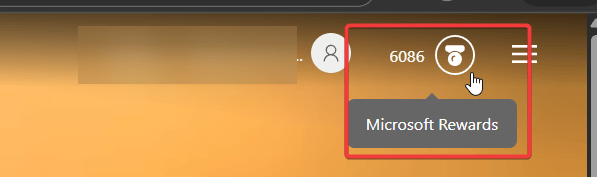
- Then click on Redeem.
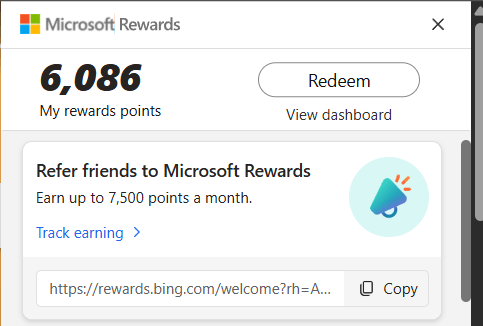
Via the Rewards Website
- Navigate to https://rewards.bing.com in any web browser.
- Select the Redeem tab.
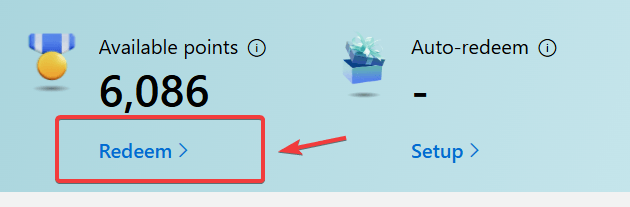
- From here, browse the available offers—such as gift cards, Xbox content, or subscriptions—and select the one you want.
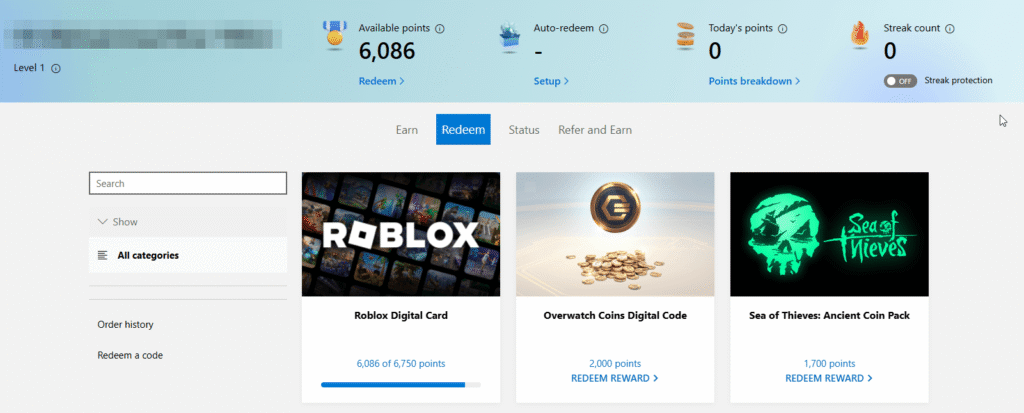
- Click REDEEM REWARD and follow the on-screen prompts to confirm

Alternatively, click Set as Goal to track your progress if you need to earn more points first.
On Xbox Console
- Power on your Xbox Console and open the native Microsoft Rewards app.
- Navigate to the Redeem section using your controller.
- Select ecosystem items like Xbox Live Gold or direct store credit.
- Once processed, the points immediately convert to digital currency linked directly to your Microsoft Store account.
On the Bing Mobile App
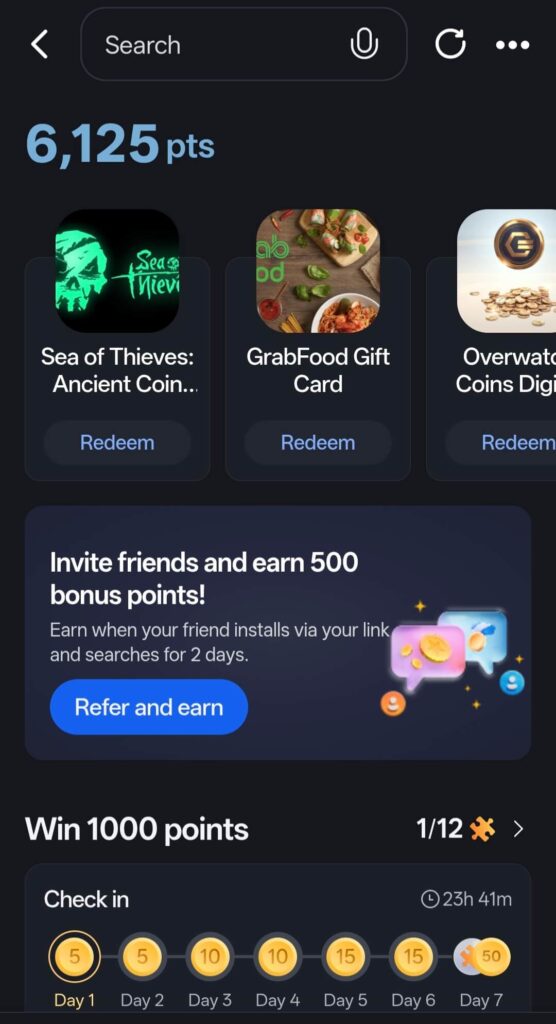
- Open the Bing app on your iOS or Android device.
- Tap your profile icon in the top left corner to access your points tally.

- Tap on your point balance to enter the mobile dashboard.

- Then select the Redeem tab to browse available mobile-friendly rewards.
Tracking Your Redeemed Rewards and Order History
Sometimes you successfully cash out, but the email with your digital code gets lost in your spam folder.
To recover a lost gift card code, navigate to the Order History page within your Rewards dashboard.
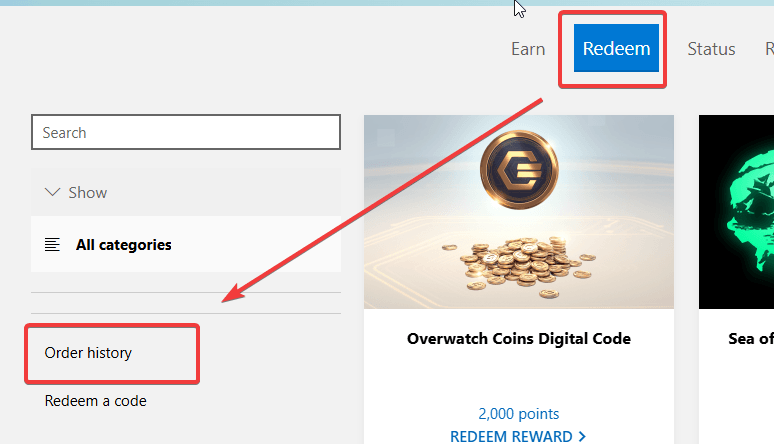
Find your recent redemption and click Get Code or Resend. This simple trick saves you from losing access to your previously claimed rewards.
What Are the Best Value Redemptions?
Not all rewards are created equal. If you want to maximize your point-to-dollar ratio, redeeming points within the Microsoft ecosystem is usually your best bet.
Xbox Game Pass Ultimate subscriptions and direct Microsoft Store gift cards typically cost fewer points per dollar than third-party options like Amazon, Starbucks, or Target gift cards.
Furthermore, if you reach Level 2 status (by earning 500 points a month), you unlock a 10% discount on Microsoft brands. You can even set up Auto-Redeem to automatically secure monthly discounts.
Sweepstakes vs. Guaranteed Redemptions (The ROI Trap)
As you browse the catalog, you will notice highly enticing options to win a Surface Pro or a custom Xbox console for just 200 points. Be warned: these are Sweepstakes entries. In my experience, spending your points on sweepstakes offers a terrible Return on Investment (ROI). Unless you feel incredibly lucky, it is always a smarter financial decision to save your balance for guaranteed direct redemptions rather than gambling them away on lottery entries.
Cashing Out for Third-Party Gaming Currencies
Gamers aren’t just limited to Xbox perks. One of the most unique aspects of the platform is the ability to redeem points directly for third-party in-game currencies.
Popular options include Riot Points (RP) for League of Legends and Valorant, Overwatch 2 Coins, and Roblox Robux.
Because Microsoft has strategic partnerships with these publishers, cashing out for these specific currencies often yields a better conversion rate than buying a generic gift card first.
Giving Back: Donating Points to Charity
If you prefer to use your balance for a good cause rather than gaming, the Microsoft ecosystem allows direct non-profit contributions. On the redemption page, look for the Donate tab.
You can select global organizations like UNICEF or localized charities depending on your current market. Microsoft processes these donations automatically, making it a frictionless way to give back without spending your own money.
Navigating Localized and Regional Rewards
Microsoft Rewards has expanded vastly beyond North America and Europe. Depending on your location, the catalog dynamically updates to offer hyper-local rewards.
For example, users in Southeast Asia (like Malaysia) or India might see exclusive options to redeem points for Grab vouchers, Shopee Pay credits, or local food delivery services.
Always check the “Shop” or “Lifestyle” categories to uncover region-specific gift cards that are tailored perfectly to your daily routine.
Common Redemption Errors (And How to Fix Them)
Many users only ask how to redeem Microsoft Rewards when the system unexpectedly throws an error at checkout. If you are stuck at the finish line, here are the exact troubleshooting steps to resolve the friction.
“There’s an issue with your account or order” Error
Warning: Using a VPN proxy to bypass geographic market restrictions will trigger an immediate account suspension.
Always disable your VPN before logging in. Furthermore, remember that you must physically be in your home region. If you are currently traveling outside of your home country, you must wait until you return to cash out your points safely.
Phone Number / SMS Verification Failing
To stop bot farms, Microsoft enforces strict security protocols. Consequently, you must verify your identity with a valid mobile or landline number. If your verification fails, it is usually because you are using a VoIP number (like Google Voice or Skype).
Microsoft’s system actively blocks VoIP numbers, so you must link a standard carrier phone number. For official policy details, check theMicrosoft Services Agreement.
The Gift Card I Want Is Missing
Reward catalogs vary heavily by region. An item like Robux might be available in the US market but temporarily out of stock or completely absent in Malaysia or the UK.
If your desired card disappears, simply wait a few days; Microsoft frequently restocks digital codes at the beginning of the month.
What to Do If Your Order Is Declined or Cancelled
Occasionally, you might receive an automated email stating your order was declined, yet your points were still deducted from your total balance. This usually happens due to a temporary inventory glitch or an automated security review.
Don’t panic; the system typically refunds the deducted points back to your account automatically within 24 to 48 hours.
How to Contact Microsoft Rewards Support
When all DIY troubleshooting fails and your account remains locked or points are missing, your final option is official escalation. Scroll to the very bottom of the Rewards dashboard and click on Contact Microsoft Rewards Support.
Fill out the support ticket with detailed information, including screenshots of the specific error codes you are receiving, to expedite the manual review process.
Microsoft Rewards Rules You Must Know
To avoid losing your account entirely, you need to understand the structural limitations set by Microsoft. Here are the most critical rules to follow:
- Household Limits: You can have a maximum of 6 accounts per household limit. However, each individual must verify their account with their own unique, non-VoIP phone number.
- Expiration Dates: Your points will expire if you do not earn or redeem any points for 18 consecutive months.
- Level System: Staying active elevates you to Level 2, granting you exclusive discounts on redemptions.
Frequently Asked Questions (FAQs)
If you are still wondering how to redeem Microsoft Rewards for specific scenarios, check out these common user questions.
Q: How long does it take to get my digital code?
A: Usually, the digital code arrives in your email inbox instantly. However, during high-traffic periods or after large updates, it can take up to 24 hours to process your request.
Q: Can I transfer my Microsoft Rewards points to another account?
Yes, but with strict limits. You can use the Microsoft Family group feature to request or send up to 5,000 points per month to verified family members.
Is there a limit on how many points I can redeem at once?
No strict daily limit exists. However, making massive, rapid redemptions might flag your account for manual review, causing a slight delay in receiving your codes.
Can I redeem Microsoft Rewards points for Robux?
Yes, you can redeem them for Roblox Digital Cards or, for better value in some regions, redeem for Microsoft Gift Cards to buy Robux via the Microsoft Store
How do I set up auto-redeem for my rewards?
he auto-redeem feature can be enabled in the Rewards app on Xbox or the dashboard to automatically claim subscriptions like Game Pass Ultimate
Why am I getting a “temporarily restricted” message when trying to redeem?
This often happens due to “rapid searching” or suspicious activity; it can last from a few days to several months
What should I do if a gift card is out of stock?
You must wait for Microsoft to restock them; users report that popular items like Amazon or specific gift card denominations frequently go out of stock
Conclusion
Ultimately, mastering how to redeem Microsoft Rewards requires understanding both the basic dashboard steps and the strict internal security policies.
By avoiding VPNs, using a valid mobile number for authentication, and targeting high-value ecosystem rewards, you can effortlessly turn your daily browser searches into real-world value.
Did this guide help you finally cash out your balance? Implement these tips today, share this post with your gaming friends to help them score free games, and drop a comment below if you run into any new dashboard errors!

IT Security / Cyber Security Experts.
Technology Enthusiasm.
Love to read, test and write about IT, Cyber Security and Technology.
The Geek coming from the things I love and how I look.