

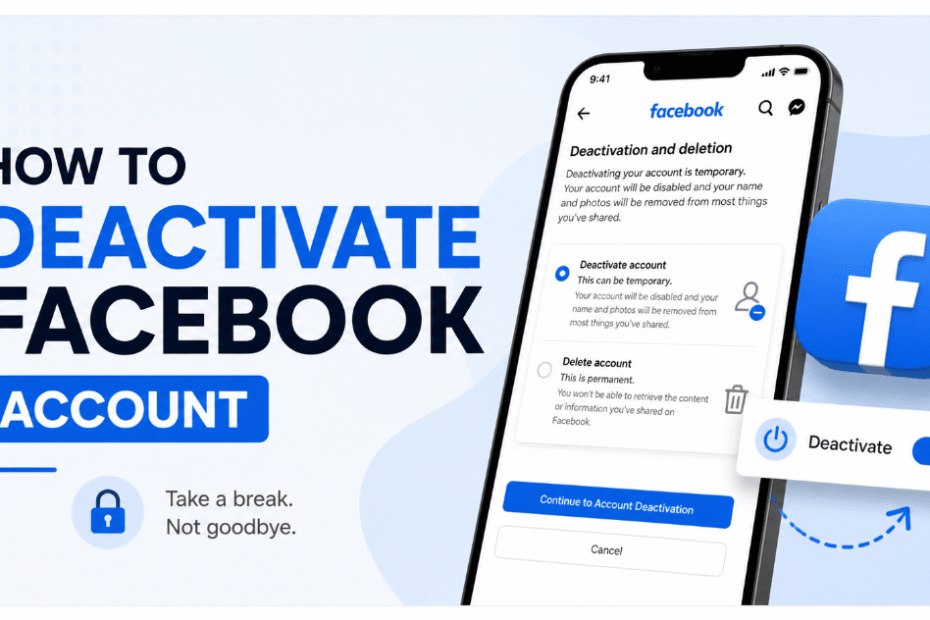
If you are wondering how to deactivate facebook account, you are not alone in wanting a break from Facebook. Taking time offline protects your privacy and mental health.
If you want to temporarily deactivate your profile, this guide provides the exact steps to successfully pause your account on both mobile and desktop. Whenever you are ready, you can always reactivate your Facebook account.
Deactivating vs. Deleting Facebook: What’s the Difference?
Before making a major change to your digital footprint, it is vital to understand the difference between deactivation and deletion.
- Deactivating: This means you close your account temporarily. Your timeline, photos, and profile become entirely invisible to the public and your Facebook friends. However, you can still use Facebook Messenger, and you can reactivate your account at any time simply by logging back in.
- Deleting: This is a permanent action to delete your account. If you choose to permanently delete your profile, after a 30-day grace period, Meta completely wipes your data. You will permanently lose your Messenger access, Oculus/Meta Quest VR purchases, and any Facebook Pages where you are the sole admin.
Alternatives: Taking a Break Instead of Deactivating
If you feel overwhelmed but aren’t ready to deactivate Facebook entirely or pursue deleting your Facebook account, Meta offers less drastic alternatives within your account settings.
You can utilize the internal “Take a Break” feature to mute specific individuals, or adjust your Privacy Checkup settings to strictly limit who can see your timeline. This approach minimizes social friction without requiring you to disconnect fully.
Before You Begin: Check Your Third-Party App Logins
Before you proceed to deactivate your account, consider how you access other online services. If you use your Facebook account for a third-party login on applications like Spotify, Pinterest, etc. you might temporarily lose access to these linked profiles.
Therefore, it is highly recommended to transition your vital logins to an email-based setup before initiating the shutdown.
Otherwise, you can proceed to see full guide on how to deactivate Facebook account.
How to Unlink Third-Party Apps Before Leaving
If you routinely use the “Log in with Facebook” button for other services, deleting your profile will instantly lock you out of those external accounts. To prevent this, you should cleanly sever these connections.
- Navigate to Settings & privacy > Settings.
- Scroll down the left sidebar and click on Apps and websites.
- Review the active list of connected services (like Spotify, TikTok, or Pinterest).
- Click Remove next to each one. Make sure you establish a new email-based login and password directly on those third-party sites before officially deleting your Meta account.
How to Deactivate Facebook Account on Desktop (Web Browser)
If you need to know how to deactivate facebook account, using a web browser on your Mac or PC is streamlined through Meta’s centralized hub.
Using Meta Accounts Center:
- Log into Facebook on your browser.
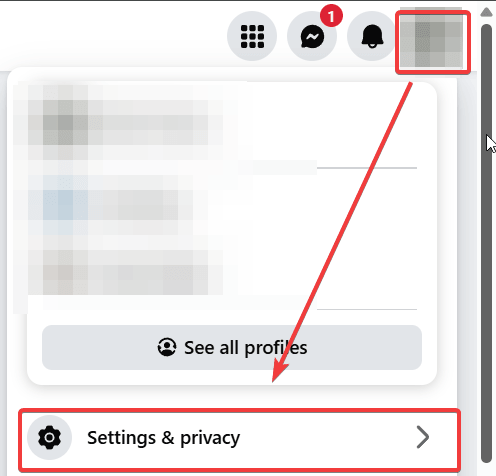
- Click your profile picture in the top right corner. Select Settings & Privacy
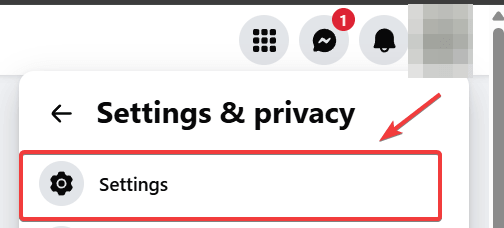
- Then click Settings to access your facebook settings.
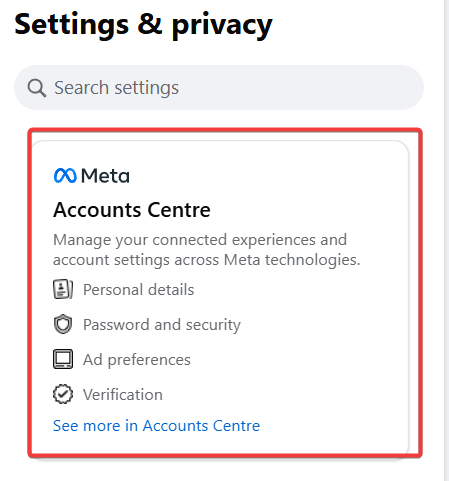
- On the left-hand sidebar, click Meta Accounts Center.
- Navigate down to Manage accounts, then click Manage on your preferrable account.
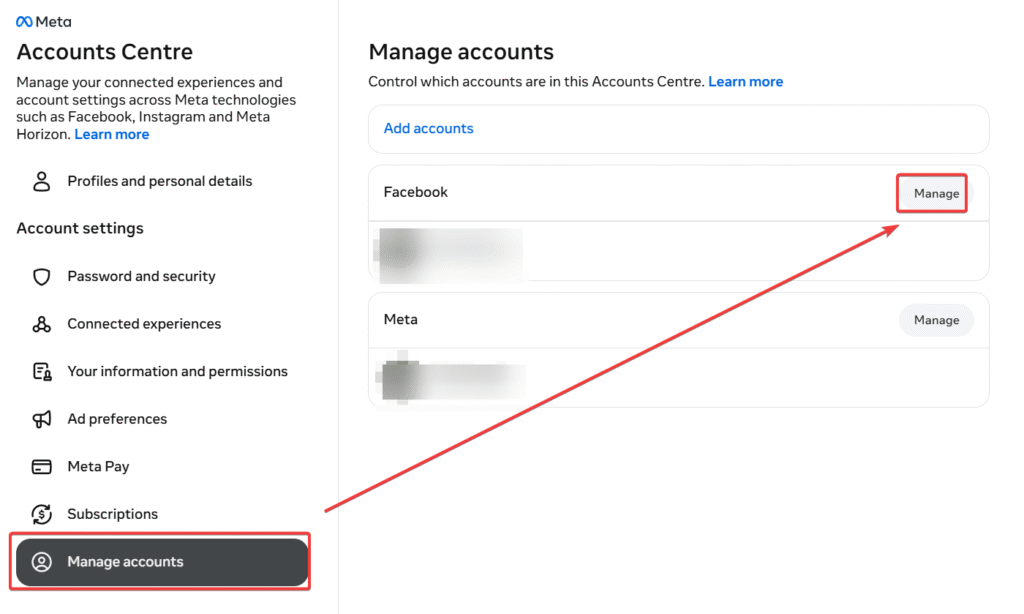
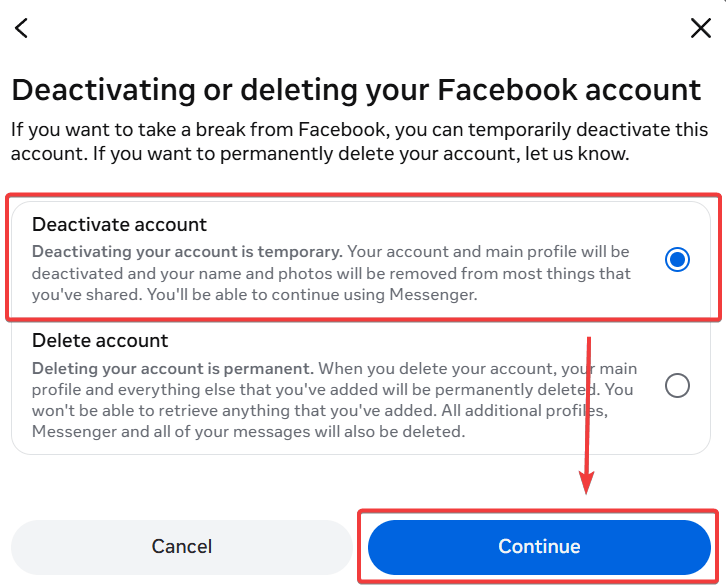
- Select Deactivate account, click Continue, enter your password, and confirm your choice.
(Note: If you do not see the Accounts Center, your application might be on a legacy version. Look directly under your general Settings for “Your facebook information” to find the link).
How to Deactivate Facebook Account on Mobile (iPhone & Android)
Searching for how to deactivate facebook account via the facebook app? Because Meta unified its user interface across both Apple iOS and Google Android, these steps will work flawlessly on almost any smartphone.
- Open the application and tap the Hamburger Menu (three horizontal lines) in the bottom right corner (iOS) or top right corner (Android).
- Scroll down and tap Settings & Privacy, then choose Settings.
- Tap the Meta Accounts Center box at the very top of the screen.
- Select Personal details.
- Tap Account ownership and control.
- Choose the option to deactivate or delete, and select your facebook profile.
- Ensure the deactivate account toggle is highlighted, hit Continue, and follow the final on-screen prompts.
Watch Out for the 7-Day Auto-Reactivation Trap
When finalizing your deactivation on either mobile or desktop, Meta will ask you for a reason why you are leaving. If you select “This is temporary, I’ll be back“, Facebook applies a default setting to automatically reactivate your account in 7 days.
To prevent this unwanted surprise, you must scroll down to the “Reactivate your account” dropdown menu and manually select “Don’t reactivate automatically.” This ensures your profile stays hidden until you choose to return.
What Happens to Facebook Messenger?
Many users want a break from the endless newsfeed scroll but still need to communicate with family. Fortunately, Facebook Messenger remains active by default when you temporarily deactivate your main profile. Your friends can still search for your name in the Messenger platform and send you direct messages.
If you want to disable chat functionality completely, you must open the separate messaging application, go to its internal Accounts Center, and disable it separately after your main account is hidden. You can read more about this policy on the official Facebook help center.
What Happens to Your Past Comments and Likes?
A common concern is the visibility of past interactions. Once your profile is disabled, your name will no longer appear next to comments you have left on friends’ photos or posts in groups.
Instead, your comments will either disappear entirely or appear as plain text from an “unnamed Facebook user”.
Furthermore, your likes will be removed from all posts until you decide to reactivate.
What Happens to Facebook Groups You Administer?
While Business Pages are often discussed, community Groups operate differently. If you are the sole admin of a Group and you turn off your profile, Facebook may automatically prompt active members to step up as the new admin.
If no one takes over, the group will become “orphaned” and may be paused or eventually archived by Facebook. Always assign a co-admin before taking your break.
Impact on Meta Pay and Active Subscriptions
A lesser-known consequence involves your digital wallet. If you have active subscriptions processed through Facebook (such as supporting a creator) or pending transactions in Meta Pay, disabling your account will temporarily freeze your ability to manage them.
To avoid unexpected charges or payment failures, cancel active subscriptions or resolve pending marketplace payments before taking action.
How to Reactivate Your Account
Did you change your mind? Reversing the process is incredibly straightforward. If you want to reactivate your account, simply open the website and log back in using your standard email and password.
As soon as you log back into Facebook, your profile, photos, and friends list will instantly be restored exactly as you left them, allowing you to use Facebook normally again.
Frequently Asked Questions (FAQ)
Can people still search for me if I deactivate?
No. Once deactivated, your profile, name, and photos vanish from search results. Your friends will not be able to visit your timeline.
Does deactivating Facebook delete my business pages?
It depends. If you are the sole administrator of a Business Page, that page will also be disabled and hidden. To prevent this, you must grant full admin control to another trusted user before you proceed.
How long can my Facebook stay deactivated?
Indefinitely. Unlike the permanent delete account option—which initiates an irreversible deletion wipe after 30 days—an account can remain dormant for years until you choose to log back in.
If I schedule my account for deletion, is it still visible to others?
Yes, all of your publicly viewable content will remain visible for up to 30 days after you log out for the final time. If you want to check if your profile is hidden, you can ask a friend to try searching for your profile
Can I cancel my account deletion if I change my mind?
Yes, you have 30 days to log back in to your account to cancel the permanent deletion
Can I keep using Messenger if I deactivate my Facebook account?
Yes, many users choose to deactivate their main Facebook profile but keep their Messenger active to stay in touch with contacts
Why do I get a “Something went wrong” error when trying to deactivate my Facebook account?
This is a known, unresolved technical bug affecting both the Android mobile app and desktop browsers (like Chrome and Firefox) that stops users on the final confirmation step
How can I fix the technical error and successfully deactivate my account?
A proven workaround is to use a PC desktop browser, open an incognito tab, turn off all ad-blocking extensions, and navigate directly to https://www.facebook.com/deactivate
Conclusion
Taking a break from social media is empowering, and knowing exactly how to deactivate facebook account ensures you stay in control of your digital footprint. If you found this step-by-step guide helpful, please share it with friends or drop a comment below with your experience!

IT Security / Cyber Security Experts.
Technology Enthusiasm.
Love to read, test and write about IT, Cyber Security and Technology.
The Geek coming from the things I love and how I look.