

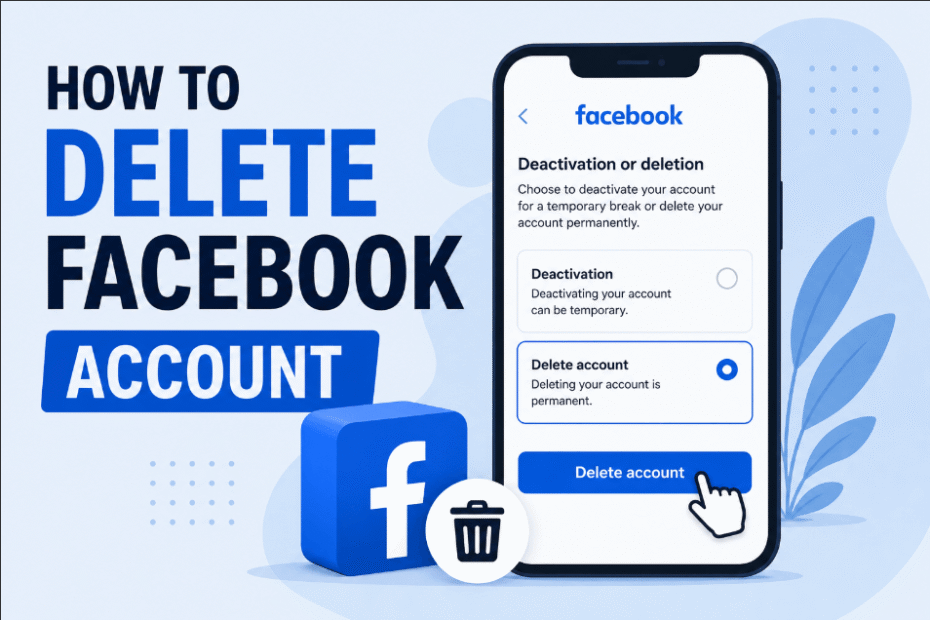
If you are searching for exactly how to delete Facebook account profiles, you are not alone. Whether for privacy concerns or digital detoxing, leaving Meta’s ecosystem requires navigating changing menus.
This updated guide walks you through every necessary step to permanently erase your online presence today.
Stop: Do This Before You Delete Your Account
Before pulling the plug on your social media presence, you must secure your digital memories. Because an account deletion permanently erases all your photos, videos, and conversations, you should urgently back up your data.
Otherwise, you can proceed to see full guide on how to delete Facebook account.
How to Download Your Facebook Data
Meta provides a dedicated tool to extract your entire digital footprint. Simply follow these steps:
- Click your profile picture in the top right corner and navigate to Settings & privacy > Settings.
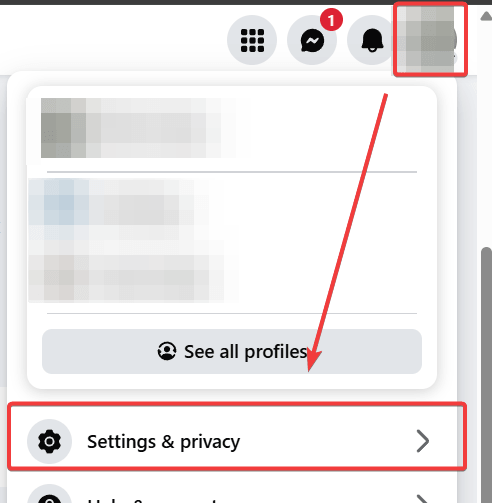
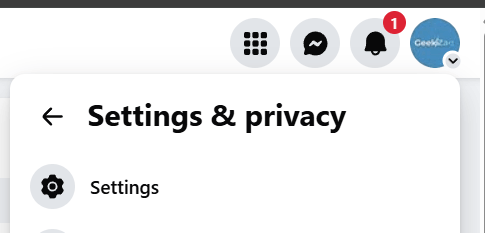
2. Click on Settings.
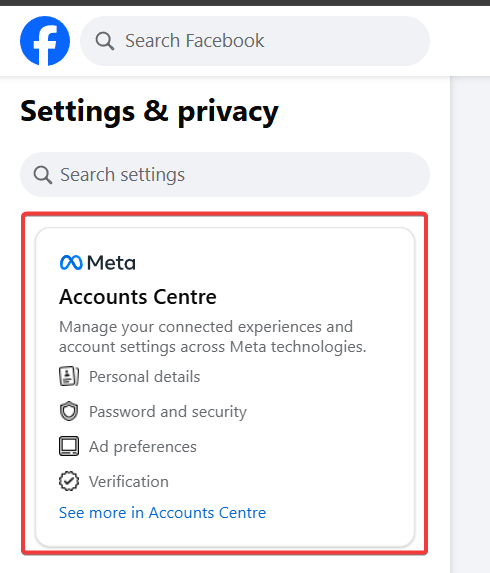
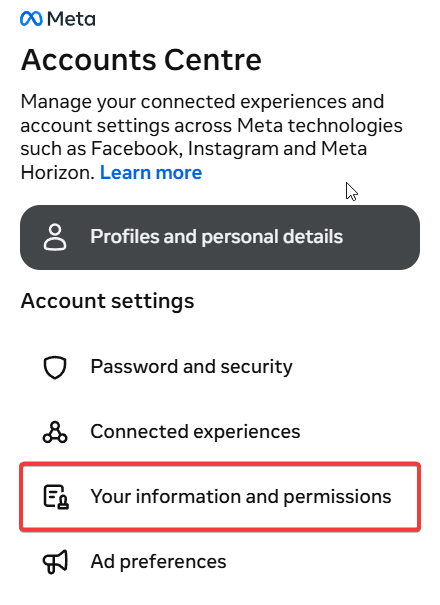
- Select the Accounts Center on the left-hand menu.
- Navigate to Your information and permissions
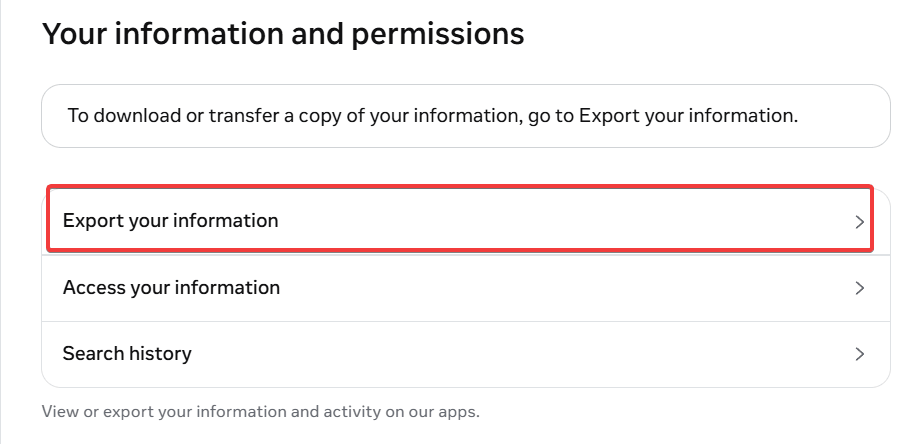
- Click Export your information.
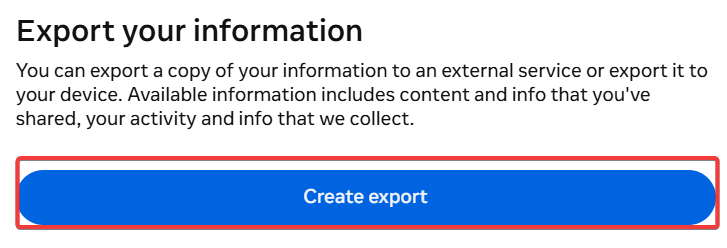
- Click Create export.
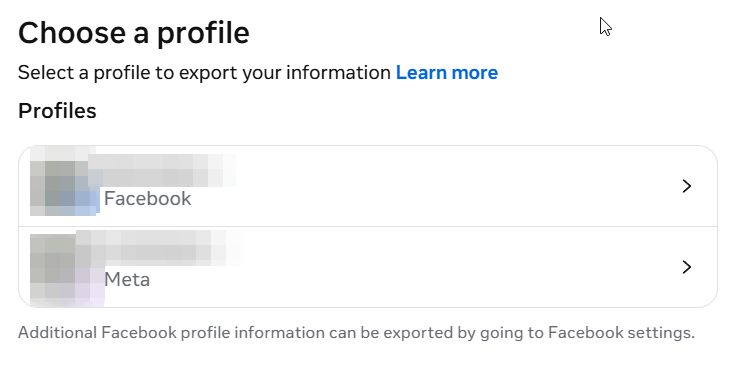
7. Select a preferred profile to export your information.
8. Click on Export to device (or Export to external service).
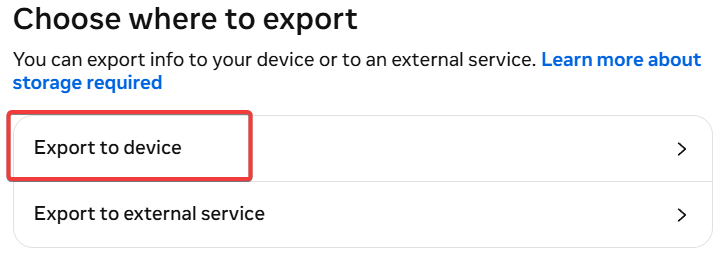
- Choose your preferrable Date range and Format. Then click Start export.
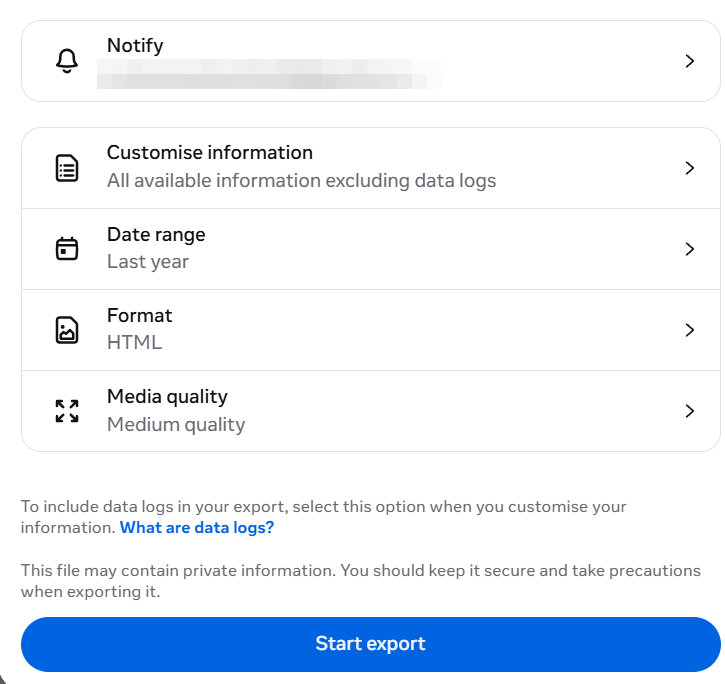
Note: Depending on the size of your archive, this file may take a few hours to generate. Do not proceed to the deletion steps until you have safely downloaded this file.
How to Unlink Third-Party Apps Before Leaving
If you routinely use the “Log in with Facebook” button for other services, deleting your profile will instantly lock you out of those external accounts. To prevent this, you should cleanly sever these connections.
- Navigate to Settings & privacy > Settings.
- Scroll down the left sidebar and click on Apps and websites.
- Review the active list of connected services (like Spotify, TikTok, or Pinterest).
- Click Remove next to each one. Make sure you establish a new email-based login and password directly on those third-party sites before officially deleting your Meta account.
Deleting the App vs. Deleting Your Account: A Common Mistake
Before proceeding to the technical steps, it is crucial to clarify a widespread misconception. Simply holding down the Facebook app icon on your smartphone and tapping “Uninstall” or “Remove App” does not delete your account.
Uninstalling the app merely removes the software from your physical device. Your profile, photos, personal data, and public visibility will remain fully active on Meta’s servers. To permanently erase your digital presence, you must execute the specific account deletion process from within the internal settings menu, as outlined below.
How to Delete Facebook Account Permanently (Desktop/Web)
When searching for how to delete Facebook account credentials on a desktop, you must use the latest Meta Accounts Center. Because Meta frequently updates its interface, follow this exact click-path for the 2026 layout:
- Click your Profile Picture in the top right corner of the Facebook homepage.
- Select Settings & privacy, then immediately click Settings.
- Locate and click on the Accounts Center (usually positioned on the top-left sidebar).
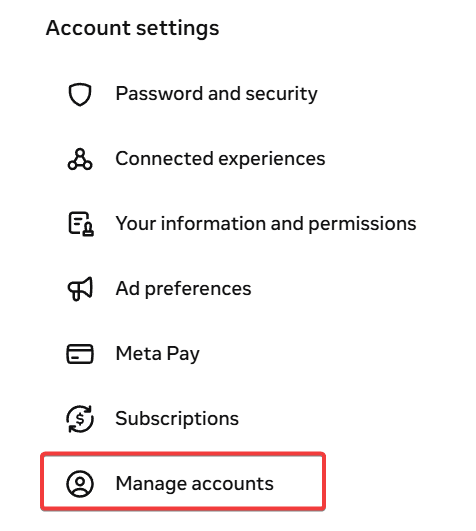
- Navigate down to Manage accounts under the Account Settings heading.
- Click Manage on your preferrable account.
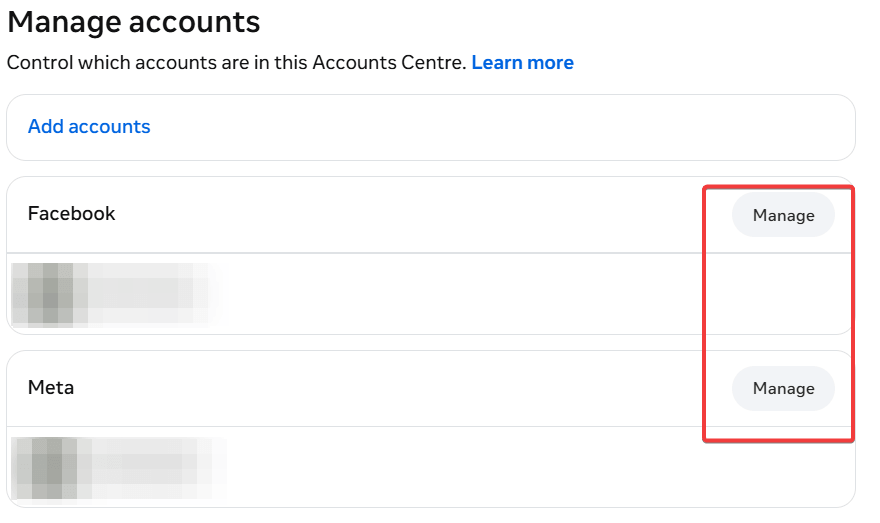
- Select Deactivation or deletion, then choose the specific Facebook profile you
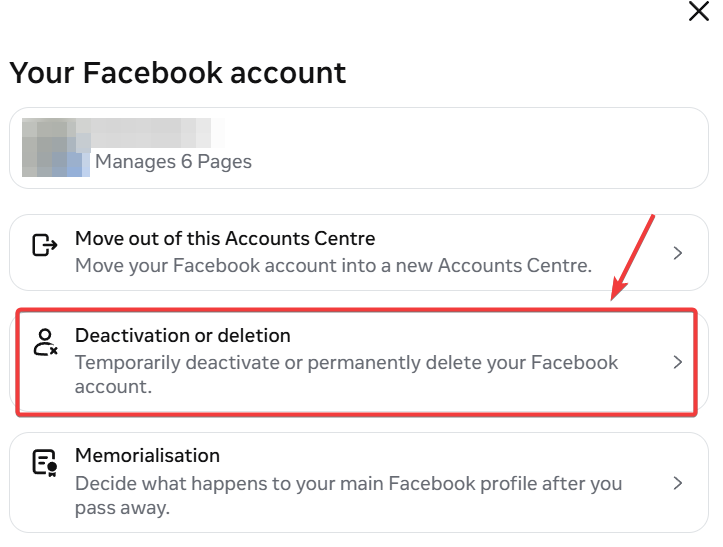
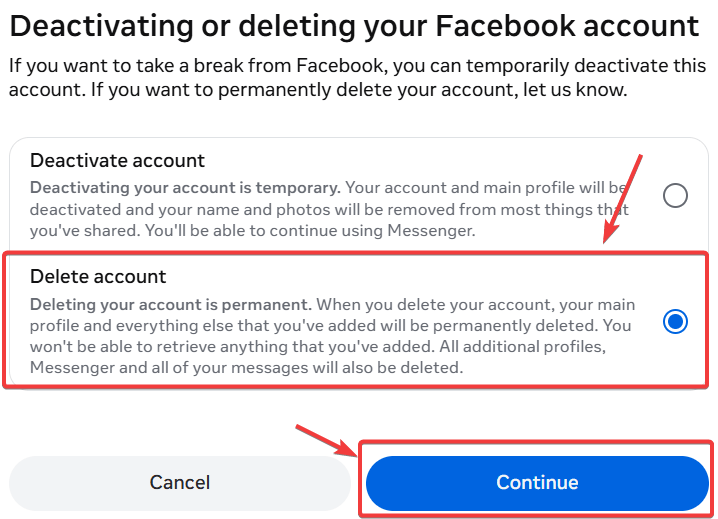
- Select Delete account, then click Continue.
How to Delete Facebook account on the Mobile App (iPhone & Android)
Figuring out how to delete Facebook account profiles on mobile requires a few extra taps, but the logic remains identical across iOS and Android devices.
- Open the Facebook app and tap the Hamburger menu (three horizontal lines) in the bottom right (iOS) or top right (Android).
- Scroll down and tap Settings & Privacy, then tap Settings.
- Tap on the Meta Accounts Center box at the very top of the screen.
- Select Personal details, then tap Account ownership and control.
- Choose Deactivation or deletion and select your Facebook profile.
- Select Delete account, tap Continue, provide your password, and confirm your final decision.
How to Delete a Deceased Loved One’s Account
If a family member has passed away, you do not need their password to close their profile. Meta provides a specific legal route to handle these sensitive situations. You can either choose to Memorialize the account (which preserves their photos and timeline for friends to visit) or permanently delete it.
To request the removal of a deceased person’s profile, you must submit a formal request through the Facebook Help Center’s Special Request page. You will need to provide verifiable documentation, such as:
- Your loved one’s death certificate.
- Power of attorney, a last will and testament, or an estate letter proving you have the legal authority to make this request.
What Happens When You Delete Your Account? (Collateral Damage)
Deleting your profile triggers a domino effect across the internet. Therefore, you must be prepared for the following collateral damage:
- Loss of Third-Party Logins: You will instantly lose access to apps and websites (like Spotify, Pinterest, or Tinder) if you actively use “Facebook Login” to access them. You must update your login credentials on those third-party sites beforehand.
- Meta Quest Erasure: If your Meta Quest (formerly Oculus) VR headset is tied strictly to your Facebook profile, you will lose all app purchases and achievements.
- Orphaned Business Pages: Any Facebook Pages where you are the sole administrator will be completely deleted. To save a business page, you must transfer admin rights to another user first.
Can I Cancel My Facebook Deletion? (The 30-Day Grace Period)
Fortunately, Meta builds in a safety net. After you initiate the deletion process, your account enters a mandatory 30-day grace period. During this window, your profile is hidden from the public, but the data is not yet destroyed.
If you change your mind, simply log back into Facebook with your email and password within those 30 days and click Cancel Deletion.
However, once day 31 hits, the process becomes irreversible. Furthermore, Meta officially notes that it can take up to 90 days for their backend servers to completely wipe your residual data from their hard drives.
Deactivating vs. Deleting Facebook: What’s the Difference?
Many users experience second thoughts when faced with a permanent deletion. Consequently, Meta offers a temporary alternative. Review the comparison table below to determine which option genuinely matches your intent.
| Feature / Consequence | Deactivating Facebook | Deleting Facebook |
|---|---|---|
| Permanence | Temporary (You can return anytime) | Permanent (Irreversible after 30 days) |
| Profile Visibility | Hidden from the public and friends | Completely erased |
| Messenger Access | Yes, you can still use Messenger | No, Messenger is permanently deleted |
| Photos & Posts | Saved securely in the background | Permanently wiped from Meta servers |
| Oculus / Meta Quest | Retains access to VR purchases | Revokes access to VR purchases |
For more insights on securing your digital identity after making your choice, check out reputable privacy guides from organizations like the Electronic Frontier Foundation (EFF).
Frequently Asked Questions
Does deleting Facebook also delete Messenger?
Yes. Because Messenger is directly tied to your core Facebook profile, deleting your account permanently destroys all your Messenger chats, media, and access. If you want to keep Messenger, you must choose to Deactivate your account instead.
Does deleting Facebook delete my linked Instagram?
No. As long as your Instagram operates under a separate login within the Meta Accounts Center, deleting Facebook will not touch your Instagram profile, photos, or followers.
Will deleting my Facebook account affect my WhatsApp?
No. Although Meta owns WhatsApp, the two applications operate on completely separate infrastructure. Because WhatsApp is tied directly to your phone number rather than your Facebook login, deleting Facebook will not affect your WhatsApp chats, contacts, or account status.
Why does my Facebook profile still show up on Google after deleting it?
Even after Meta permanently wipes your account, a link to your old profile or images might still appear in search engines like Google or Bing for a few weeks. This happens because search engines rely on “cached” (saved) versions of websites. Once Google’s bots recrawl Facebook and see the page is gone, the results will naturally drop off. You can expedite this by using Google’s Outdated Content Removal Tool.
How do I delete an old Facebook account if I forgot the password?
First, attempt to recover the account by going to facebook.com/login/identify and searching for your name, email, or phone number. You can use a trusted friend’s account to view your old profile and report it as “Fake” or “Pretending to be me” to trigger a manual review and potential takedown by Facebook support.
How long does it take for Facebook to permanently delete my account?
It takes up to 90 days for Facebook to fully remove all of your information from their systems
Can I download my photos and posts before deleting my account?
Yes, during the deletion process, Facebook will prompt you with an option to download your information (like your 15 years of photos) before you finalize the request
Does permanently deleting my Facebook account delete the messages I sent? Answer
No. While the messages will no longer be visible to you, they will remain in the recipient’s inbox. Your chat bubbles will still exist, but your name may appear as “Facebook User” or show “message unavailable”
Do I need to unlink my Instagram before deleting Facebook?
If you are having trouble deleting your account through the Meta Accounts Center, users recommend unlinking your Instagram account first to allow the Facebook deactivation/deletion to move forward
Conclusion
Mastering how to delete Facebook account settings gives you ultimate control over your online privacy, time, and mental well-being. By following these exact steps, backing up your precious data, and understanding the 30-day grace period, you can confidently walk away from the platform without losing anything important.
Are you ready to take the plunge, or are you opting for a temporary deactivation? Implement this advice today, share this updated guide with friends looking to unplug, and let us know your thoughts in the comments section below!

IT Security / Cyber Security Experts.
Technology Enthusiasm.
Love to read, test and write about IT, Cyber Security and Technology.
The Geek coming from the things I love and how I look.