


Are you getting paid for your everyday internet searches, gaming sessions, and online shopping? If you aren’t using Microsoft Rewards, you are leaving free money on the table.
In this comprehensive guide, we will cover everything you need to know about the Microsoft Rewards program, how it works, and how you can start turning your digital footprint into gift cards, game passes, and premium sweepstakes entries.
What is Microsoft Rewards?
Formerly known as Bing Rewards, Microsoft Rewards is a free, points-based loyalty program created by Microsoft. The premise is simple: Microsoft wants to encourage users to utilize their ecosystem—such as the Bing search engine, the Microsoft Edge browser, the Microsoft Store, and Xbox consoles.
In exchange for your loyalty and engagement, they reward you with digital points.
These points hold actual monetary value within the Microsoft ecosystem and through partnered retailers. Once you accumulate enough points, you can exchange them for a vast array of digital and physical rewards.
Key Benefits of Joining
- It’s 100% Free: There are no sign-up fees or hidden subscription costs.
- Passive Earning: You earn points for doing things you already do, like searching the web.
- Massive Rewards Catalog: From free coffees to Xbox Game Pass subscriptions, the redemption options are highly versatile.
- Tiered System: The more you participate, the higher your “Level” becomes, allowing you to earn more points and get discounts on reward redemptions.
How Does Microsoft Rewards Work?
The Microsoft Rewards ecosystem operates on three basic principles: Search, Shop, and Play.
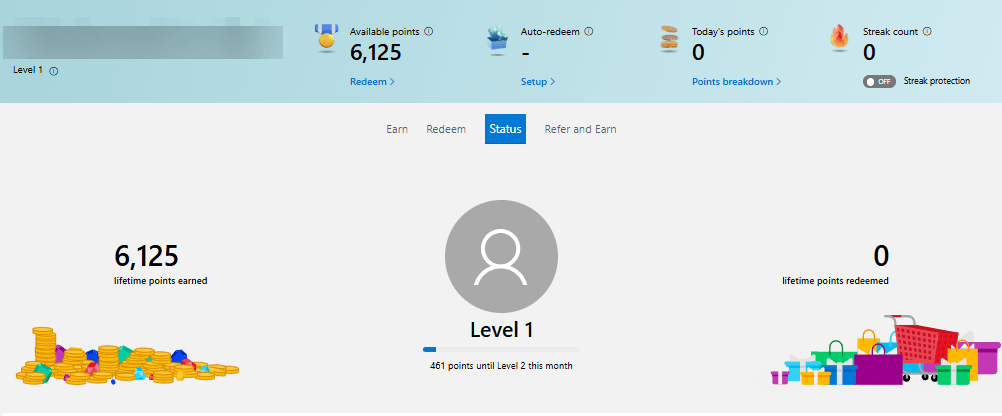
When you log into your Microsoft account on your PC, mobile device, or Xbox console, the system tracks your eligible activities and deposits points directly into your account dashboard.
You can view your points tally at any time via the Microsoft Rewards dashboard or the Microsoft Edge browser extension.
Earning Microsoft Rewards Points
Earning points is incredibly straightforward, but maximizing your daily intake requires a bit of strategy. Microsoft provides numerous avenues to build up your points balance:
- Searching with Bing: Earning points by making Bing your default search engine on both desktop and mobile.
- Using Microsoft Edge: Getting bonus points for actively using Microsoft’s flagship browser.
- Completing Daily Sets: Answering quick trivia questions, taking polls, and clicking on daily featured articles.
- Gaming on Xbox: Earning points by playing specific games, unlocking achievements, and completing Xbox Game Pass Quests.
- Shopping: Getting cashback-style points when you purchase apps, hardware, or movies from the Microsoft Store.
Because there are so many unique strategies, daily caps, and multiplier secrets, we’ve created a dedicated deep-dive guide.
👉 Read our complete, step-by-step strategy on how to earn Microsoft Rewards fast to maximize your daily points yield.
Redeeming Microsoft Rewards Points
Once you’ve built up a healthy stash of points, it’s time for the fun part: spending them! The Microsoft Rewards catalog is vast and caters to all types of users, whether you are a hardcore gamer, an avid shopper, or someone who loves giving back.
Popular redemption categories include:
- Gift Cards: Amazon, Starbucks, Target, Walmart, and more.
- Xbox Ecosystem: Free Xbox Game Pass Ultimate subscriptions, Xbox gift cards, and PC Game Pass.
- In-Game Currency: Robux (for Roblox), Minecoins (for Minecraft), and League of Legends Riot Points.
- Sweepstakes: Entries to win custom gaming PCs, Xbox consoles, and massive points bundles.
- Charitable Donations: Microsoft allows you to automatically donate your points to charities like the WWF, UNICEF, or local non-profits.

Knowing exactly when to cash in your points (and how to avoid redemption errors) is crucial to getting the best value.
👉 Ready to claim your prizes? Check out our ultimate guide on how to redeem Microsoft Rewards for tips on getting the best bang for your buck.
Microsoft Rewards Level 1 vs. Level 2
To encourage consistent engagement, Microsoft Rewards features a two-tier status system.
Level 1 (Beginner)
When you first sign up, you start at Level 1.
- You can earn points for up to 10 Bing searches per day.
- Standard redemption rates apply to all gift cards and rewards.
Level 2 (Pro)
If you earn 500 points in a single month, you are automatically upgraded to Level 2. Maintaining Level 2 requires earning at least 500 points each subsequent month—which is very easy if you search daily.
- You can earn points for up to 50 Bing searches per day (combining mobile and desktop).
- Up to 10% discount on reward redemptions from Microsoft brands.
- Access to exclusive bonus offers and sales.
Is Microsoft Rewards Worth Your Time?
Absolutely. While you won’t get rich or pay your mortgage with Microsoft Rewards, it is one of the most generous, low-effort loyalty programs on the internet today.
If you make a few simple tweaks to your daily digital habits—like switching your search engine to Bing and taking two minutes to complete the daily trivia—you can easily earn enough points to pay for your Xbox Game Pass subscription or a few cups of premium coffee every single month.
Frequently Asked Questions (FAQ)
Is Microsoft Rewards completely free?
Yes, Microsoft Rewards is completely free to join. You only need a valid Microsoft account (such as an Outlook, Hotmail, or Xbox Live account) to opt-in and start earning.
Do Microsoft Rewards points expire?
Yes. Microsoft Rewards points will expire if there are no earning or redeeming activities on your account for 18 months. As long as you do a quick Bing search or complete a daily poll once a year, your points are safe.
Can I transfer my points to another account?
Microsoft previously allowed users to share points with family members via a Microsoft Family group, but this feature has been phased out in many regions. Currently, points are tied to the individual account that earns them.
Is it safe to use a VPN to earn more points?
No. Using a Virtual Private Network (VPN) to access different regional markets for extra points goes against the Microsoft Services Agreement. Doing so will likely result in a permanent ban from the Rewards program.
Ready to become a Rewards master? Don’t forget to bookmark our specialized guides:

IT Security / Cyber Security Experts.
Technology Enthusiasm.
Love to read, test and write about IT, Cyber Security and Technology.
The Geek coming from the things I love and how I look.