


Microsoft Rewards Robux is the ultimate way to earn free currency for your favorite games. However, most users are redeeming their points inefficiently.
This guide reveals the secret strategies to maximize your earnings and get significantly more Robux for your points.
Microsoft Rewards Robux – How to redeem
If you have a Roblox Digital Card:
- Go to the official Roblox redemption page at roblox.com/redeem.
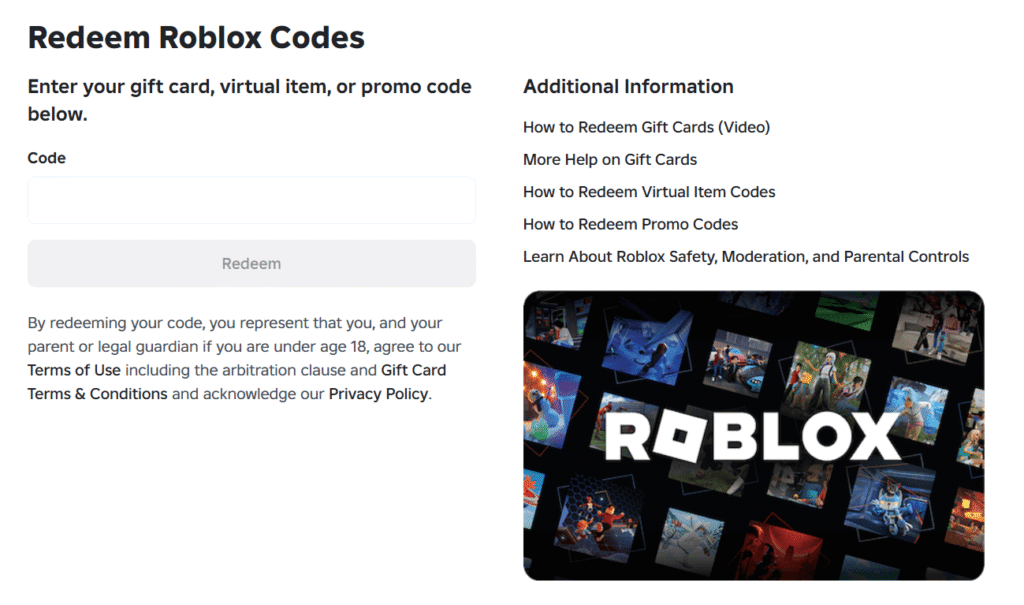
- Alternatively, from the Roblox homepage, you can click on “Gift Card” in the left menu and then select “Redeem Card” in the top right corner.
- Log into your Roblox account.
- Enter the digital PIN code that was sent to your email into the designated box.
- Check the box to agree to the terms and conditions, and click “Redeem”. The Robux will be instantly credited to your virtual balance.
If you have a Microsoft Gift Card:
- First, redeem the code at account.microsoft.com/billing/redeem to add the funds to your Microsoft account balance.
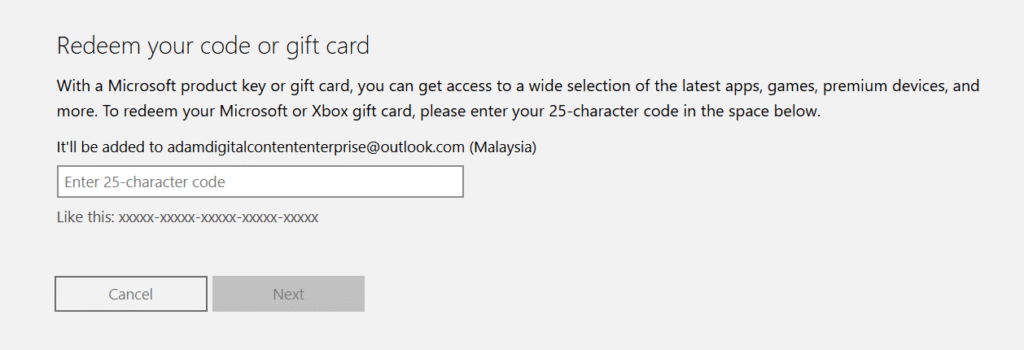
- Open the Microsoft Store version of Roblox on a Windows PC or an Xbox console. Keep in mind that this method does not work on the mobile app versions (iOS/Android) of Roblox.
- Navigate to the in-game shop to purchase Robux.
- At checkout, select “Microsoft Account Balance” as your payment method to complete the transaction.
1. The “Arbitrage” Hack: Get More for Less
The single most effective trick for saving points is avoiding the direct “Roblox Digital Card” reward. While it seems convenient, the point-to-value ratio is actually lower than other methods.
Why the Microsoft Gift Card is Better
Expert users recommend redeeming a Microsoft Gift Card instead. You can use this balance to purchase Robux through the Microsoft Store version of Roblox on PC or Xbox.
- Point Efficiency: For a Level 2 user, a $5 Microsoft Gift Card costs roughly 4,750 points.
- Direct Cost: A 400 Robux card typically costs 6,750 points.
- The Result: Using the gift card route provides a 29% to 37% “discount” on your acquisition cost.
Note: This strategy is only available to players on Windows PC or Xbox consoles; the Microsoft account balance cannot be used on mobile versions (iOS/Android).
Microsoft intentionally prices their proprietary gift cards cheaper to encourage users to spend money directly within the Microsoft Store ecosystem, rather than Microsoft having to pay a 30% platform cut to Roblox for direct digital cards.
(Note: This arbitrage strategy is strictly limited to PC and Xbox platforms and does not work on iOS/Android versions of Roblox.)
How to Execute
- Redeem the Microsoft Gift Card to add balance to your Microsoft account.
- Then, download the Microsoft Store version of Roblox on your PC or Xbox.
- Go to the in-game shop, buy the Robux, and select “Microsoft Account Balance” as your payment method at checkout.
2. Your Daily Protocol for 10,000 Points Per Month
Earning Microsoft Rewards Robux requires a consistent routine. By leveraging all available platforms, you can earn roughly 10,000 to 12,000 points every month.
Daily Search Strategy
- Bing PC Searches: Perform 30 searches for 150 points.
- Mobile Searches: Use the Bing app for 20 searches to earn 100 points.
- Microsoft Edge Bonus: Searching via the Edge browser adds a small daily bonus of 12 points.
- Search Cooldown: Be aware that many regions now have a 6-second cooldown between searches to prevent botting.
Gaming and Dashboard Bonuses
- Daily Sets: Complete the three tasks on your dashboard for 15 points.
- Streaks: Maintain your daily set streak to earn 150-point bonuses every 10 days.
- Xbox Game Pass: Playing any Game Pass title for 15 minutes rewards you with 20 points.
- Xbox Mobile App: Playing the “Jewel” mini-game and logging in daily adds up to 30 points.
👉 Read our complete, step-by-step strategy on how to earn Microsoft Rewards fast to maximize your daily points yield.
3. New for 2026: Gold and Silver Tiers
The program recently shifted from a basic Level 1/2 system to a more advanced tier structure.
The Gold Member Advantage
Reaching Gold Tier (requiring 750 points of monthly activity) unlocks massive multipliers.
- 7x Point Boost: Gold members can earn seven times more points on specific activities.
- Bing STAR Bonus: This new feature rewards “authentic” human searches with an extra monthly pool of up to 2,100 points.
- Weekly Puzzles: Completing 12 weeks of searches awards a 1,000-point puzzle bonus.
4. Troubleshooting: What if Robux is Missing?
If the Roblox option disappears from your Microsoft Rewards Dashboard, don’t panic. This is usually due to regional stock issues or account flags.
- Inventory Limits: Microsoft buys codes in bulk; when they run out, the option is removed until a restock occurs.
- The Amazon Workaround: If Roblox is unavailable, redeem for an Amazon Gift Card and use it to buy a Roblox code on Amazon.
- Avoid VPNs: Using a VPN to access other regional catalogs is the fastest way to get your account banned.
- Don’t Use Bots: Automated scripts and macro clicking are violations. Microsoft enforces cool-down periods and search limits designed specifically to catch these scripts.
- Avoid VoIP Phone Numbers: You must verify your account with a real phone number. Microsoft explicitly bans Voice-over-IP (VoIP) numbers (like Google Voice or Skype) to prevent mass-account creation.
Frequently Asked Questions
How many Microsoft Rewards points for 100 Robux?
While the 100 Robux card (1,500 points) is frequently removed, the common baseline is now 6,750 points for 400 Robux.
Why was the 400 Robux offer removed?
Microsoft often adjusts its catalog due to regional volatility or stock outages. In some regions like Turkey or Kazakhstan, it may be removed due to local bans or distribution limits.
How do I redeem my Robux code?
Once you receive your digital PIN via email, go to the Roblox Redemption Page to credit the balance to your account.
Why isn’t my Robux code working?
If you redeemed points for a Microsoft Gift Card instead of a direct Roblox Digital Card, the balance must be spent within the Microsoft Store or Xbox version of the Roblox app. The code will not work on the mobile (iOS/Android) or web versions of Roblox
How do I enter my Robux code on Roblox?
If you claimed a direct Roblox Digital Card, log into your account at roblox.com/redeem and enter the code. If you claimed a Microsoft Gift Card, redeem the code at your Microsoft billing page, then purchase Robux from the in-game shop using your “Microsoft Account Balance”
- What is Microsoft Rewards And Why You Should Use It !
- 17 Ways How To Earn Microsoft Rewards Points Fast (Ultimate Guide)
- How to redeem Microsoft Rewards (Ultimate Guide)
Conclusion
Implementing these strategies is the most reliable way to secure Microsoft Rewards Robux for free.
By leveraging the Microsoft Gift Card arbitrage and maintaining your Gold status streaks, you can significantly reduce the “grind” time.
Start your daily searches today, share these tips with your fellow gamers, and let us know in the comments how many points you’ve stacked up this month!

IT Security / Cyber Security Experts.
Technology Enthusiasm.
Love to read, test and write about IT, Cyber Security and Technology.
The Geek coming from the things I love and how I look.